
Transcription and word timing
TalkWeaver writes out the words of a recording on your Mac, so you can find passages, cut words and make captions. This page lists what your computer needs, shows how to choose a language, and explains what precise word timing adds.
What your computer needs
Built-in transcription and precise word timing have separate requirements. Check each row.
| Feature | What your computer needs |
|---|---|
| Built-in transcription | macOS 26 and a language your Mac supports. The public Mac app is for Apple silicon. Not available on Windows. |
| Precise word timing | macOS 14 or newer. English or Czech only. Not available on Windows. |
| External engine | An engine you have installed and set up on that computer. The speech engine that ships with TalkWeaver needs Apple silicon. On Windows you need a compatible engine of your own. |
Choose built-in transcription and a language
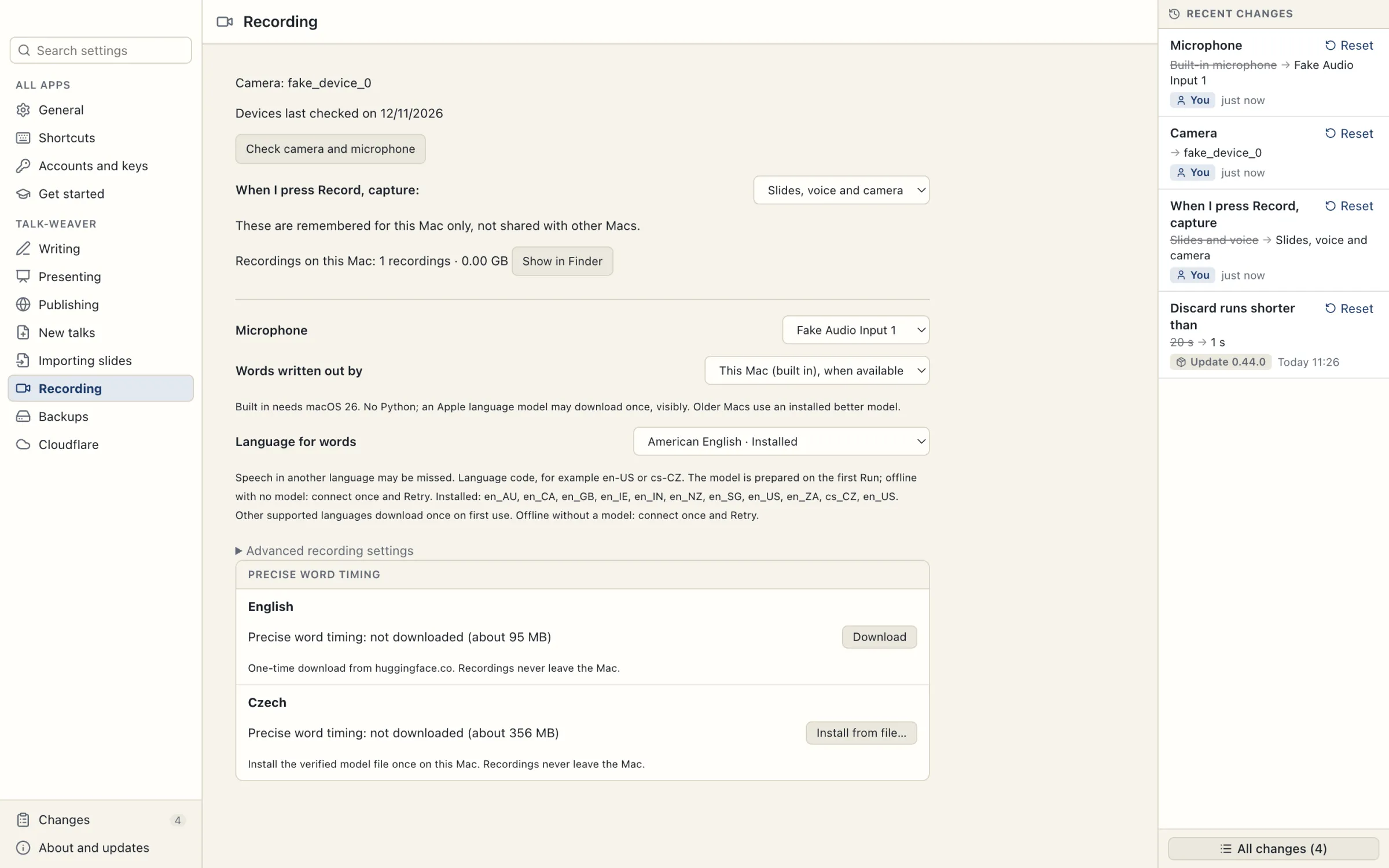
- Open Settings › Recording. The two settings to use are Words written out by and Language for words.
- In Words written out by, choose This Mac (built in), when available or This Mac (built in). The first uses the built-in engine when this Mac has it, and otherwise an external engine you have set up. The second always uses the built-in engine.
- In Language for words, choose the language you speak. Settings checks this Mac and marks each available language Installed or Needs download. A language model may download once, the first time you use it.
- Save a recording. The progress reads Writing out your words or Preparing this Mac’s speech model.
- If the attempt fails, choose Retry words in the presenter view or Try again in the editor. If you are offline and the model is not installed, connect once and retry.
Languages
The built-in language choices include Arabic, Catalan, Chinese (including Cantonese), Croatian, Czech, Danish, Dutch, English, Finnish, French, German, Greek, Hebrew, Hindi, Hungarian, Indonesian, Italian, Japanese, Korean, Malay, Norwegian Bokmål, Polish, Portuguese, Romanian, Russian, Slovak, Spanish, Swedish, Thai, Turkish, Ukrainian and Vietnamese. Some have regional variants. Settings shows the list of languages your Mac supports. A language on this list may still need its model downloaded; Settings marks which ones are Installed.

Precise word timing
Precise word timing lets the editor place cuts on word boundaries. It also helps the editor move slide changes and time captions. Without it, the transcript still works and cuts snap to clear pauses.
It supports English and Czech. It needs macOS 14 or newer and is not available on Windows. It works on words that are already written out, so on a Mac older than macOS 26 it also needs an external engine. Its timing model is separate from the built-in speech language model, so installing one does not install the other.
- Open Settings › Recording › Precise word timing.
- English has a Download button (about 95 MB). Czech has an Install from file… button: it needs a model file (about 356 MB) that TalkWeaver does not download for you, and there is no public download for that file yet. Without it, cuts in Czech recordings snap to clear pauses.
When the editor offers Download for …, the button names the language and the download size. The download stays on this Mac. Listen across a cut before exporting.
Use an external engine
An external transcription engine that you have installed is an option in place of the built-in one.
- Open Settings › Get started and find the Transcription section. It checks the engine’s Python, script and ffmpeg paths and shows Ready or what is missing.
- Follow its Set-up steps for anything missing. ffmpeg ships with TalkWeaver; leave its path empty to use that copy.
- Once the engine is configured, Installed better model (Parakeet) appears under Settings › Recording › Words written out by.
Other Macs, Windows and known limits
- Built-in transcription is not available on Windows, or on Macs without the required macOS version or language support. An external engine can be used when it is configured for that computer.
- The speech engine that ships with TalkWeaver needs Apple silicon. On Windows you need a compatible engine of your own.
- Without transcription, recording, playback and export still work. Word editing and captions need words.
- Built-in processing happens on this Mac. The first language-model download needs a connection.
- Speech in a different language from the chosen setting may be missed.